Design & Navigation Changes to Tes Parents Meetings and Clubs & Events
A Fresh New Look is Coming
Over the coming weeks, Tes will be introducing a refreshed design and navigation experience for Parents Meetings and Clubs & Events.
These updates are part of our ongoing commitment to creating a more modern, intuitive, and consistent experience across Tes products. While some areas of the interface will look different, the way you create, manage, and run your events will remain largely unchanged.
What's Changing?
The update focuses on visual improvements and navigation enhancements, making it easier to move around the platform while providing a more recognisable Tes experience.
New Tes-Branded Design
You'll notice a refreshed interface that aligns more closely with the wider Tes product ecosystem. This includes:
- A new Tes-branded header across the platform
- Updated page layouts
- A cleaner, more modern visual design
- Improved consistency across Tes products
Simplified Navigation
We've streamlined navigation to make it easier to find the tools and information you need.
Key changes include:
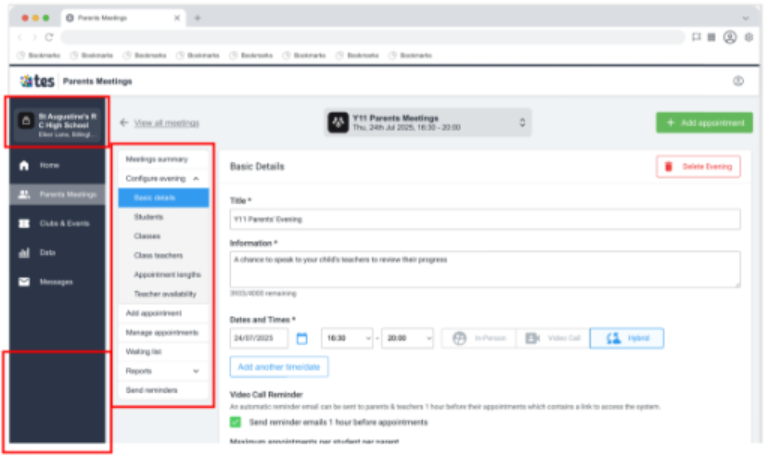
School Information Moves to the Left Navigation Panel
Your school name and logo will now be displayed within the left-hand navigation area rather than the header.
Sub-Menus Move Into the Main Page Area
Navigation options that previously appeared as nested menus in the left-hand navigation will now be displayed within the relevant page. This provides a clearer and more contextual navigation experience.
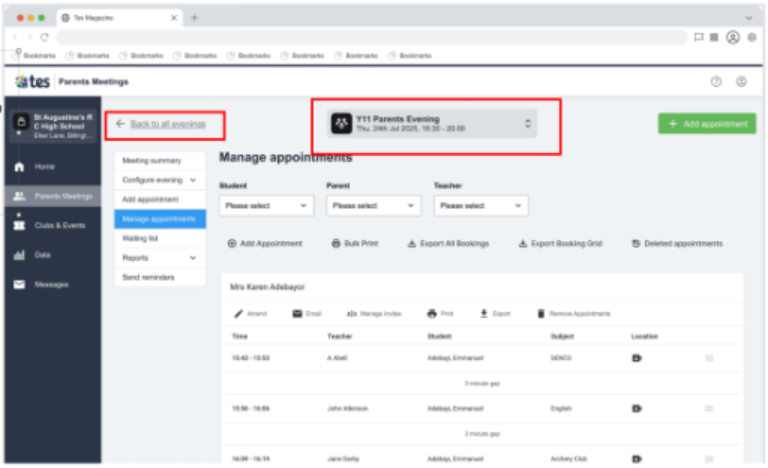
New "Back" Navigation
Many pages will now feature a breadcrumb-style Back button, making it easier to return to previous screens.
Meeting Selector Improvements
The meeting switcher is moving to a more prominent position and will now display additional meeting information, including dates and times.
Account and Support Options Relocated
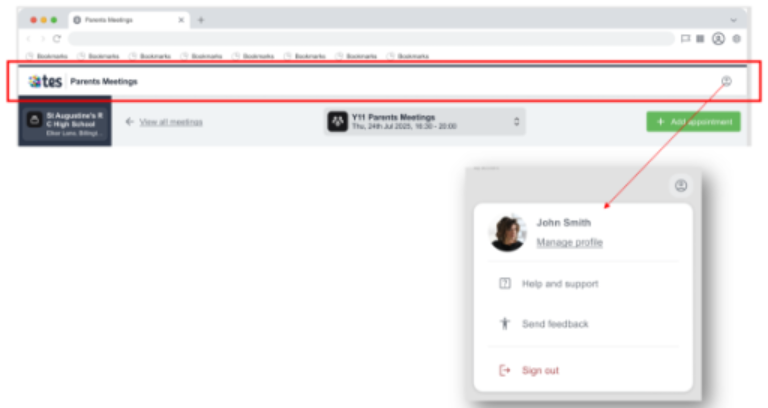
To create a more consistent experience, account-related actions and support resources are moving from the left navigation menu into the user profile menu located in the header.
This includes:
- Manage Profile
- Help and Support
- Feedback
- Sign Out
These options will be accessible from the user icon in the top-right corner of the application.
What Isn't Changing?
While the appearance of the platform is being updated, the core functionality remains the same.
You can continue to:
- Create and manage Parents Meetings as you do today
- Run existing workflows and processes
- Access your current data and settings
- View your historical meetings and event information
No existing functionality is being removed as part of this release.
Who Will Be Affected?
These changes apply to all customers using:
- Tes Parents Meetings
- Tes Clubs & Events
Administrators and event organisers will notice the most significant navigation changes. Teachers and parents will primarily experience visual updates and branding enhancements.
Why Are We Making These Changes?
This update supports Tes's wider product modernisation strategy and helps create a more connected experience across our products.
Benefits include:
- Clearer and more intuitive navigation
- Stronger consistency across Tes products
- Reduced friction when moving around the platform
- Foundations for future improvements and enhancements
Frequently Asked Questions
Will I need to learn a new way of using Parents Meetings?
No. The release focuses on visual design and navigation improvements. Existing workflows and functionality remain unchanged.
Are any features being removed?
No existing functionality is being removed as part of these changes.
Will parents see any changes?
Parents may notice some visual updates, but there are no changes to the underlying meeting experience or booking functionality.
Why can't I find a menu option where it used to be?
Some navigation items have been relocated as part of the simplified navigation experience. Common moves include:
- Account and support options moving to the profile menu in the header.
- Sub-menu options moving into the main page content area.
When will I receive the update?
The update will be rolled out automatically as part of a phased release programme throughout the rollout period. No action is required from your school.
Quick Summary
|
Before |
After |
|
School information shown in the header |
School information shown in the left navigation |
|
Sub-menus displayed within left navigation |
Sub-menus displayed within page content |
|
Help and account links in left navigation |
Help and account links in profile menu |
|
Existing page navigation |
Additional breadcrumb-style back navigation |
|
Older product styling |
Refreshed Tes-branded design |
Need Help?
If you have questions about these changes, please contact the Tes Support team. The update is designed to improve the overall user experience while keeping your existing workflows familiar and unchanged.
Visual Examples