Seamless Login & App Switching
A More Connected Tes Experience is Coming
Over the coming weeks, Tes will be introducing Seamless Login and App Switching to Parents Meetings and Clubs & Events.
These enhancements are designed to make it easier for school staff who use multiple Tes products to move between applications without unnecessary interruptions. Together, they create a more connected experience across the wider Tes ecosystem while maintaining the security and access controls you already rely on.
What's Changing?
We're introducing two new features designed to help eligible users move more efficiently between participating Tes products.
Seamless Login
Seamless Login enables users with a Tes Universal Login account to move between participating Tes products without having to sign in again each time.
As long as you have access to the destination product and it supports Seamless Login, you'll be able to move directly between products while maintaining a secure authenticated session.
This means less time signing in and more time focusing on day-to-day school activities.
New App Switcher
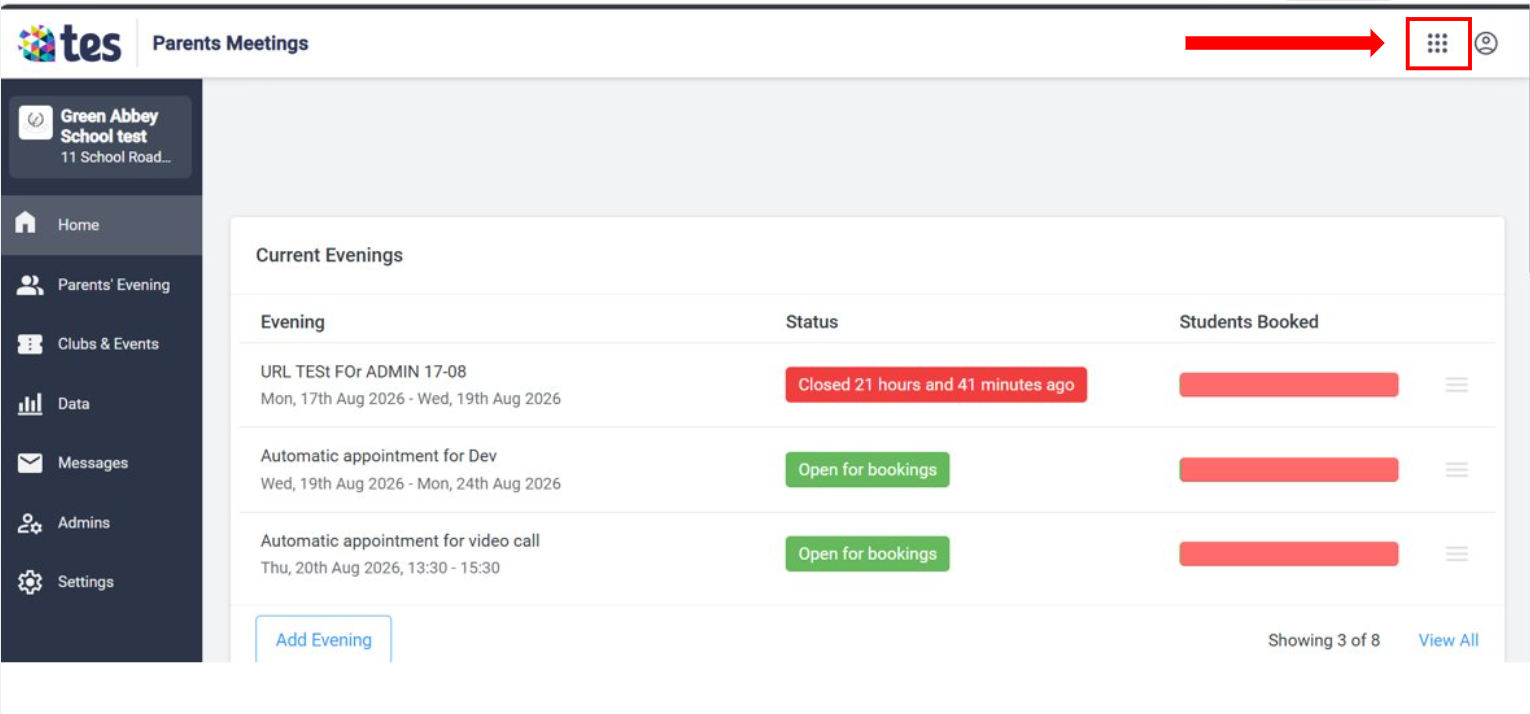
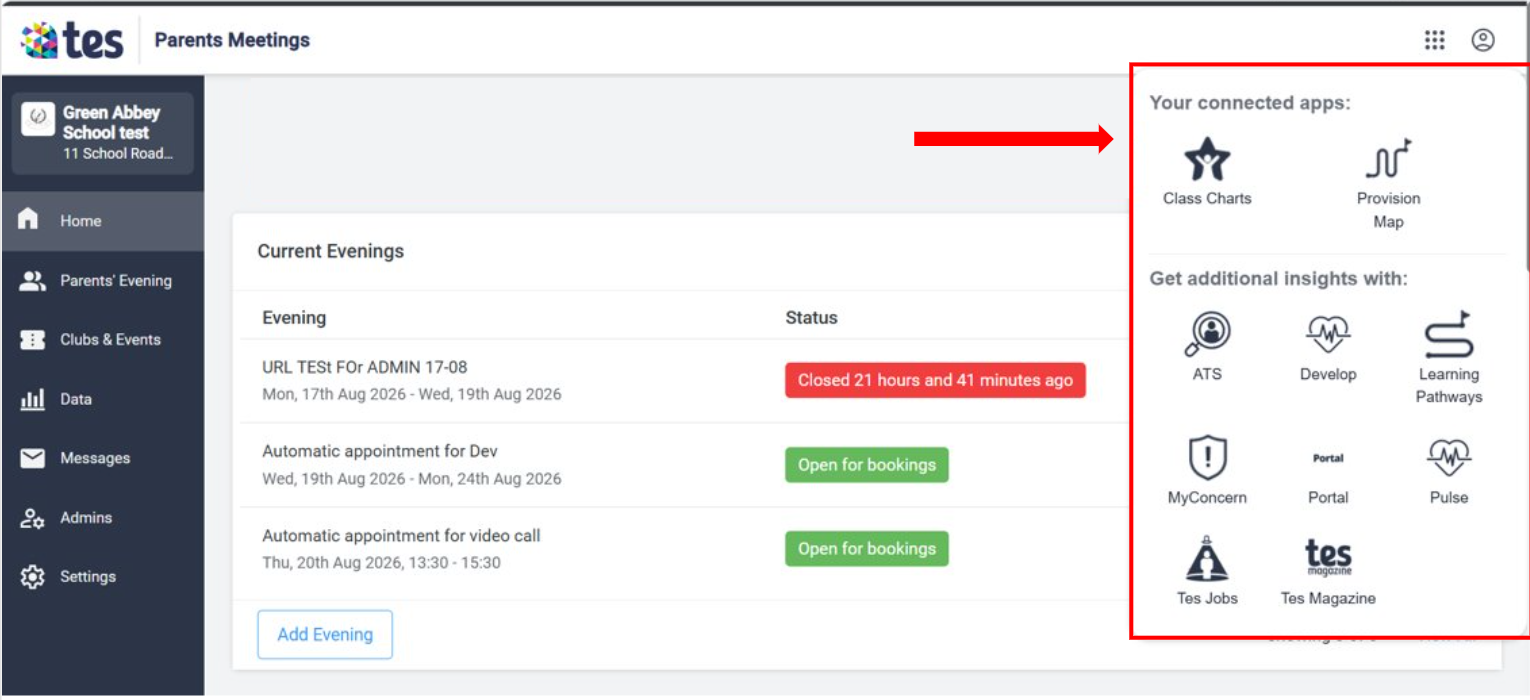
A new App Switcher icon will be added to the Tes-branded header. This provides quick access to other Tes products from within Parents Meetings or Clubs & Events.
The App Switcher allows eligible users to:
- View available Tes products
- Navigate between participating Tes applications
- Access products directly from a central location
- Move more easily between connected workflows
The App Switcher will be visible to Admin and Teacher users. Parent users will not see the App Switcher.
Accessing Other Tes Products
If your school subscribes to another participating Tes product and you have the required permissions, selecting that product from the App Switcher will take you directly into it.
Examples of participating Tes products may include:
- Class Charts
- MyConcern
- Provision Maps
- Other supported Tes applications
If your school does not subscribe to a selected product, you may be directed to a product information or marketing page instead.
What Isn't Changing?
While accessing Tes products will become simpler, there are no changes to the core functionality of Parents Meetings or Clubs & Events.
You can continue to:
- Create and manage meetings as normal
- Run existing workflows and processes
- Access your current data and settings
- Use the platform in the same way you do today
The update adds convenience and connectivity without changing how the products work.
Who Will Be Affected?
These changes apply to all schools using:
- Tes Parents Meetings
- Tes Clubs & Events
The users most likely to benefit are:
- School Administrators
- Teachers
- Staff who regularly use multiple Tes products
Parent users are not included in this release and will not see the App Switcher.
Why Are We Making These Changes?
These enhancements form part of Tes's wider strategy to create a connected product ecosystem and improve the overall user experience.
Benefits include:
- Reduced time spent logging into multiple systems
- Easier navigation between Tes products
- Improved workflow efficiency for busy school staff
- A more connected and consistent experience across the Tes platform
Frequently Asked Questions
What is Seamless Login?
Seamless Login allows users with a supported Tes account to move between participating Tes products without needing to log in again for each application.
What is the App Switcher?
The App Switcher is a new icon in the Tes header that provides access to participating Tes products from a single location.
Who can use the App Switcher?
The App Switcher is available to Admin and Teacher users. Parent users will not see the feature.
Will I always be signed in automatically?
Not always. If the destination product does not support Seamless Login, or if you do not have permission to access that product, you may still be asked to sign in.
What happens when I sign out?
Logging out of one participating Tes product will sign you out of the shared session across participating products. This helps maintain a secure experience across the Tes ecosystem.
Will security settings change?
No. Existing security controls such as session timeouts, logout behaviour and multi-factor authentication (MFA) continue to operate as expected.
Why was I taken to a marketing page instead of a product?
If your school does not subscribe to a selected Tes product, the App Switcher may direct you to information about that product rather than the application itself.
Do I need to do anything to enable these features?
No. The update will be delivered automatically as part of the planned rollout.
Quick Summary
| Before | After |
|---|---|
| Separate logins between supported Tes products | Seamless movement between participating products |
| No central product navigation | New App Switcher available in the Tes header |
| Users may need to sign in repeatedly | Reduced need for repeated authentication |
| Limited visibility of other Tes products | Easier discovery and access to linked Tes products |
| Disconnected product experience | More connected Tes ecosystem experience |
Need Help?
If you have questions about Seamless Login or App Switching, please contact the Tes SchoolCloud Support team.
These improvements are designed to save time, reduce friction and make it easier to work across multiple Tes products while maintaining the same secure experience you use today.
Visual Examples